(二十三)从注册走到重开后的删除
1. 让小例自动读取表单令牌
完整演示使用临时数据文件,不改变正在运行的书架。先用标准库 HTMLParser 读取实际隐藏字段:
# 项目文件:demos/project_walkthrough.py
# 从返回的 HTML 中提取隐藏的 CSRF 令牌,后续提交使用页面实际生成的值。
from html.parser import HTMLParser
from pathlib import Path
from tempfile import TemporaryDirectory

from shelfweb import create_app
from shelfweb.db import init_db


class TokenParser(HTMLParser):
    def __init__(self):
        super().__init__()
        self.value = None

    def handle_starttag(self, tag, attrs):
        attrs = dict(attrs)
        if tag == "input" and attrs.get("name") == "csrf_token":
            self.value = attrs["value"]


def token(client, path):
    parser = TokenParser()
    parser.feed(client.get(path).text)
    return parser.value
handle_starttag 在解析器遇到开始标签时被调用,attrs 是属性键值对列表。token 请求页面,再从名为 csrf_token 的输入中取值,后面的 POST 像浏览器一样提交它。
2. 注册、登录并保存一本书
# 续写同一文件:demos/project_walkthrough.py
# 先注册并登录临时账户,再用该会话新增书籍,沿真实表单流程检查结果。
with TemporaryDirectory() as directory:
    config = {
        "TESTING": True,
        "SECRET_KEY": "walkthrough-only-key",
        "DATABASE": str(Path(directory) / "books.sqlite3"),
    }
    app = create_app(config, instance_path=directory)
    with app.app_context():
        init_db()
    client = app.test_client()
    credentials = {"username": "reader", "password": "learn-reader"}
    print(
        "注册",
        client.post(
            "/auth/register",
            data={**credentials, "csrf_token": token(client, "/auth/register")},
        ).status_code,
    )
    print(
        "登录",
        client.post(
            "/auth/login",
            data={**credentials, "csrf_token": token(client, "/auth/login")},
        ).status_code,
    )
    created = client.post(
        "/books/new",
        data={
            "title": "Python Web",
            "tags": "网络",
            "csrf_token": token(client, "/books/new"),
        },
    )
    location = created.headers["Location"]
    print("新增", created.status_code, "详情", client.get(location).status_code)
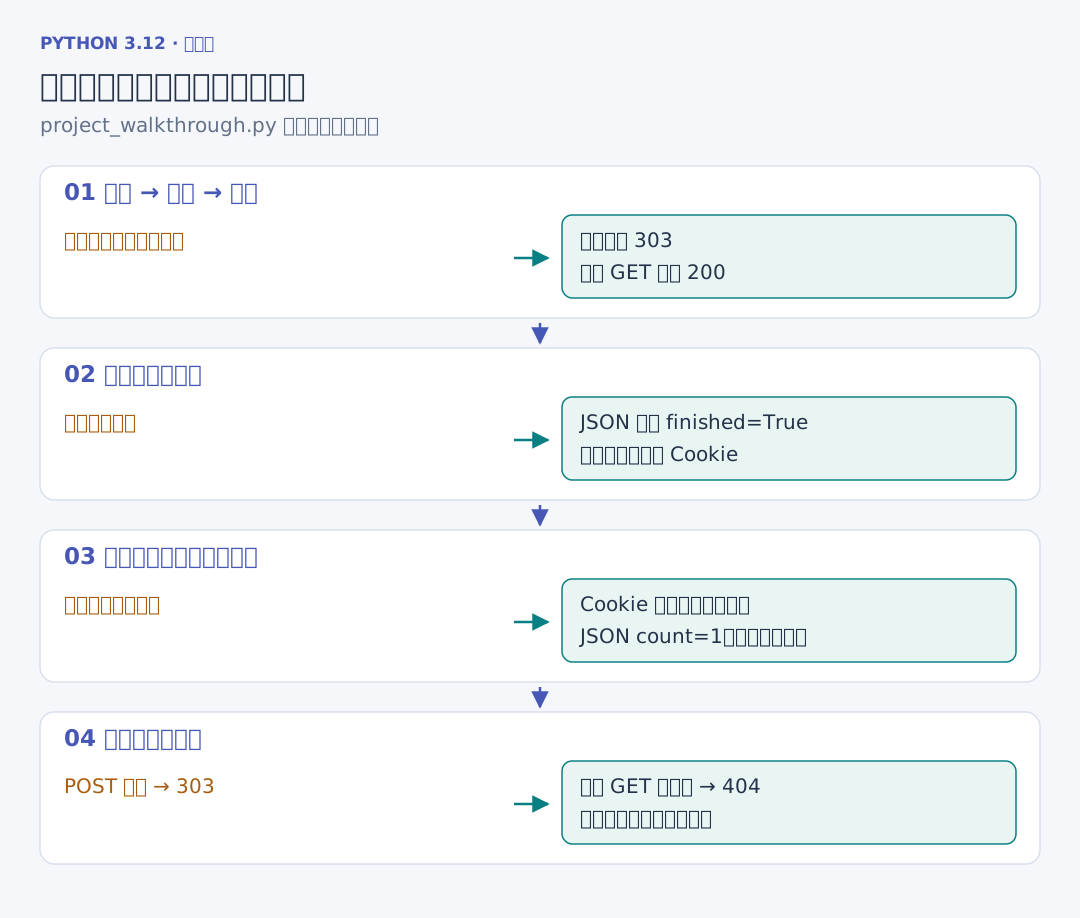
注册和登录成功均为 303;新增也返回 303,Location 指向新书详情,详情请求为 200。接着勾选已读并提交:
# 续写同一文件:demos/project_walkthrough.py
    # 编辑时重新读取表单令牌;提交后检查跳转页面中的书名和标签已经更新。
    client.post(
        location + "/edit",
        data={
            "title": "Python Web",
            "finished": "1",
            "csrf_token": token(client, location + "/edit"),
        },
    )
    print("修改后已读", client.get("/api/books").json["books"][0]["finished"])
JSON 读取到布尔值 True。下面重新创建应用,使用同一文件和签名依据,把浏览器已有 Cookie 带到新客户端:
# 续写同一文件:demos/project_walkthrough.py
    # 重建应用后从同一数据库读回书籍,再删除它,核对持久化与完整操作链。
    cookie = client.get_cookie("shelf_session").value
    reopened = create_app(config, instance_path=directory).test_client()
    reopened.set_cookie("shelf_session", cookie)
    print("重开仍有", reopened.get("/api/books").json["count"], "本")
    print(
        "删除",
        reopened.post(
            location + "/delete", data={"csrf_token": token(reopened, location)}
        ).status_code,
    )
    print("删除后详情", reopened.get(location).status_code)
重开后仍有一本书,删除返回 303,再次读取旧详情为 404。运行 uv run python ../demos/project_walkthrough.py 可以重复核对整条链。
3. 在浏览器中检查真正的页面动作
浏览器按下面的顺序操作:登录 alice,查看六本书;提交筛选,只显示未读;新增《Python Web》,刷新详情,数量没有增加;修改为已读;退出后登录 bob,书架为空,并且无法修改 alice 的编号;回到 alice 删除新书,核对旧详情和列表。
Network 中应看到 POST、303、后续 GET 的连续请求。输入带尖括号的书名时,Elements 中应是同一段可见文字,没有创建额外图像或脚本节点。Cookie 中的登录凭据与隐藏令牌不放进截图或提交记录。
配套核验还停止第一个服务进程,再启动第二个独立进程,使用同一实例目录与浏览器凭据读取刚才的记录。实际结果见 核验记录。