(十六)由独立前端引出跨源读取
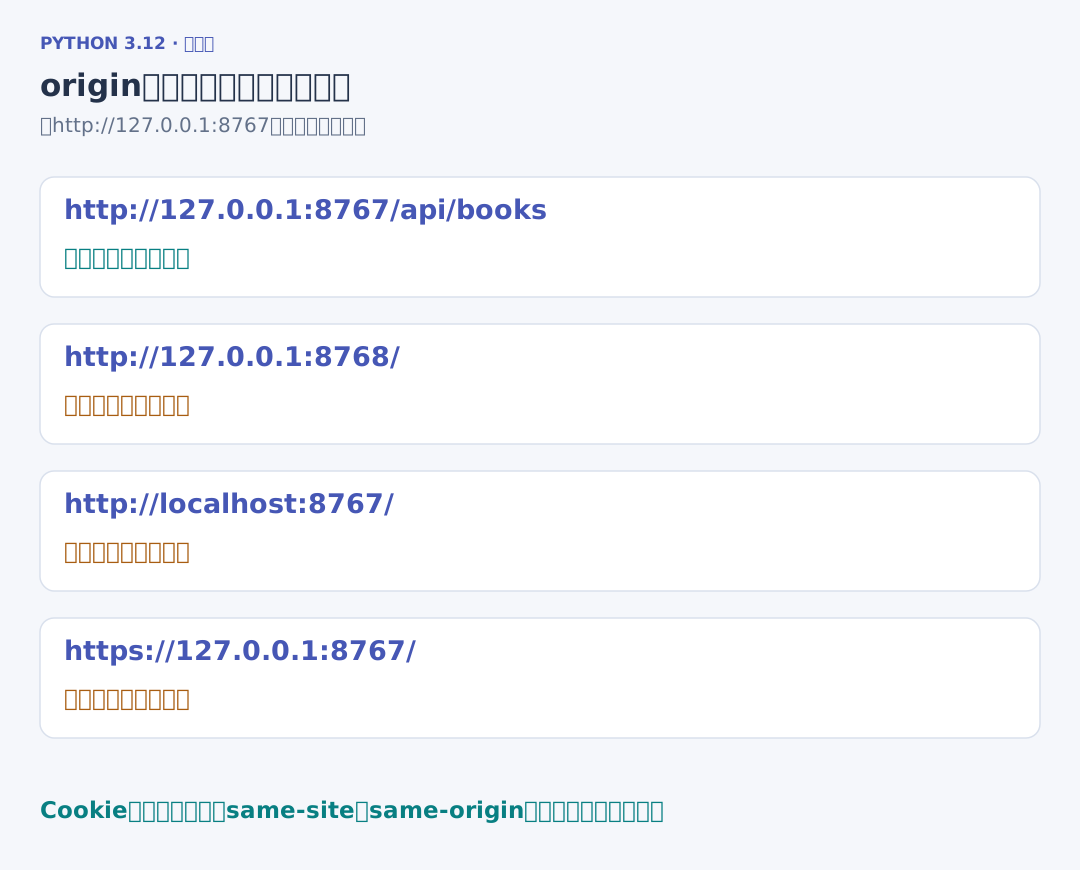
1. 协议、主机与端口共同决定 origin
书架页面与 /api/books 都来自 http://127.0.0.1:8767,属于同源。把前端页面放在 http://127.0.0.1:8768 后,端口改变,origin 就不同;只改变路径不会改变 origin。
浏览器的同源策略约束页面脚本访问其他来源的响应。CORS(跨源资源共享)让服务器通过响应头为具体来源开放读取。它没有把“来自前端页面”自动转换成“已经登录”或“可以修改任意用户记录”。
2. 带自定义头的请求先进行预检
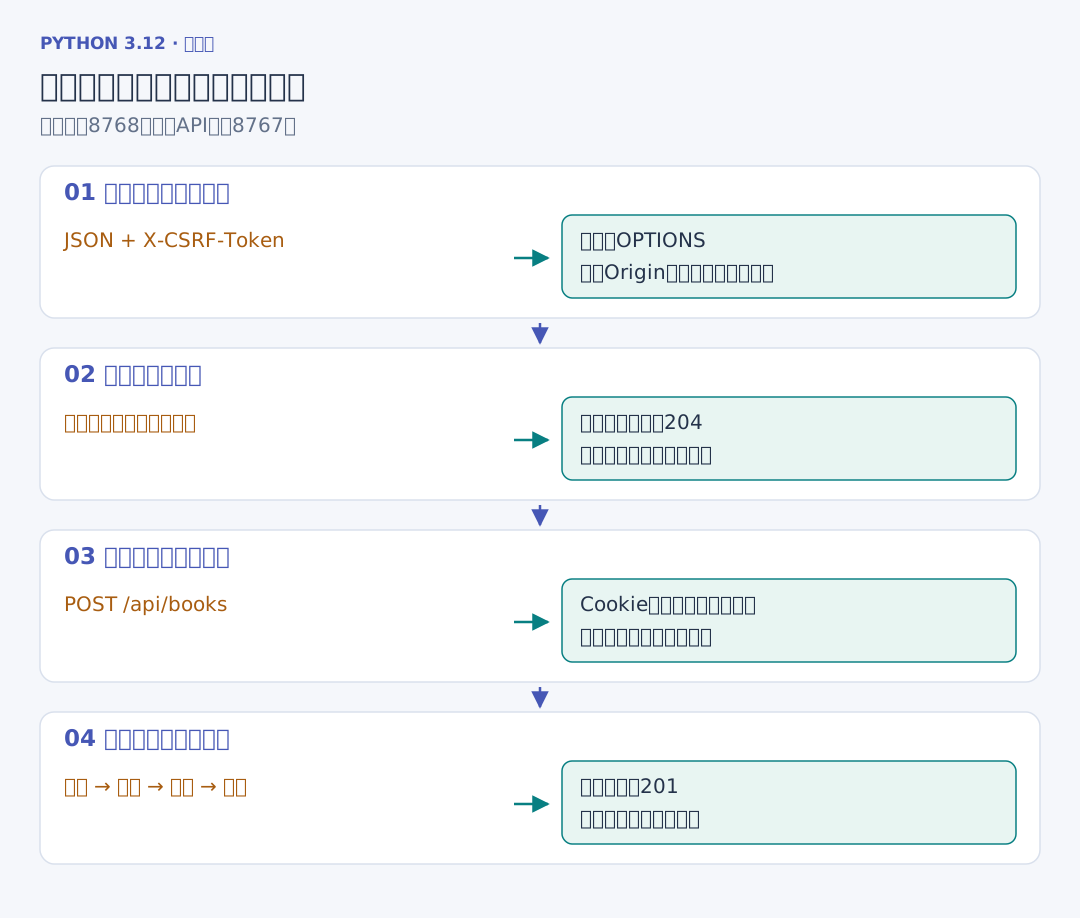
独立前端要以 JSON 写入并携带 X-CSRF-Token,浏览器会先发 OPTIONS,说明想用的请求方法与头字段。服务器许可后,浏览器才发送实际写入请求。
# 项目文件:web_project/src/webbook/cors.py
# 浏览器先核对来源和预检许可;服务器仍独立核对登录、CSRF和记录归属。
from dataclasses import dataclass

from .http import Problem, Response
from .routing import route


@dataclass
class CorsPolicy:
    origins: set[str]

    def preflight(self, request):
        if request.method != "OPTIONS" or not request.path.startswith("/api/"):
            return None
        origin = request.headers.get("origin")
        if origin not in self.origins:
            raise Problem(403, "这个来源没有跨源读取许可")
        requested_method = request.headers.get("access-control-request-method", "")
        _, _, methods = route(requested_method, request.path)
        requested_headers = {
            part.strip().lower()
            for part in request.headers.get("access-control-request-headers", "").split(
                ","
            )
            if part.strip()
        }
        if not requested_headers <= {"content-type", "x-csrf-token"}:
            raise Problem(403, "预检请求了未获许可的头字段")
        return Response(
            204,
            headers=[
                ("Access-Control-Allow-Methods", ", ".join(methods)),
                ("Access-Control-Allow-Headers", "Content-Type, X-CSRF-Token"),
            ],
        )

    def decorate(self, request, response):
        if request.path.startswith("/api/"):
            response.headers.append(("Vary", "Origin"))
            origin = request.headers.get("origin")
            if origin in self.origins:
                response.headers.extend(
                    [
                        ("Access-Control-Allow-Origin", origin),
                        ("Access-Control-Allow-Credentials", "true"),
                    ]
                )
        return response
preflight 核对来源,再沿同一路由表核对方法,确认请求头在许可列表中;204 表示这次预检没有正文。decorate 为允许的来源加上具体的 Access-Control-Allow-Origin;涉及 Cookie 时同时返回 Access-Control-Allow-Credentials。
Vary: Origin 表明响应头会随请求来源改变。带凭据的读取使用明确的来源地址,不能用星号代替。CORS 协议过程
3. 请求到达与脚本读到响应是两个结果
# 项目文件:demos/cors_preflight.py
# HTTPX展示协议响应;浏览器是否交出跨源结果,另用实际浏览器操作核对。
from webbook.lab import lab_client, login

with lab_client() as (client, _app, _database):
    login(client)
    response = client.options(
        "/api/books",
        headers={
            "Origin": "http://front.test",
            "Access-Control-Request-Method": "POST",
            "Access-Control-Request-Headers": "Content-Type,X-CSRF-Token",
        },
    )
    print("预检", response.status_code, response.headers["access-control-allow-origin"])
    allowed = client.get("/api/books", headers={"Origin": "http://front.test"})
    denied = client.get("/api/books", headers={"Origin": "http://other.test"})
    print(
        "允许来源",
        allowed.status_code,
        allowed.headers["access-control-allow-credentials"],
    )
    print(
        "其他来源", denied.status_code, "access-control-allow-origin" in denied.headers
    )
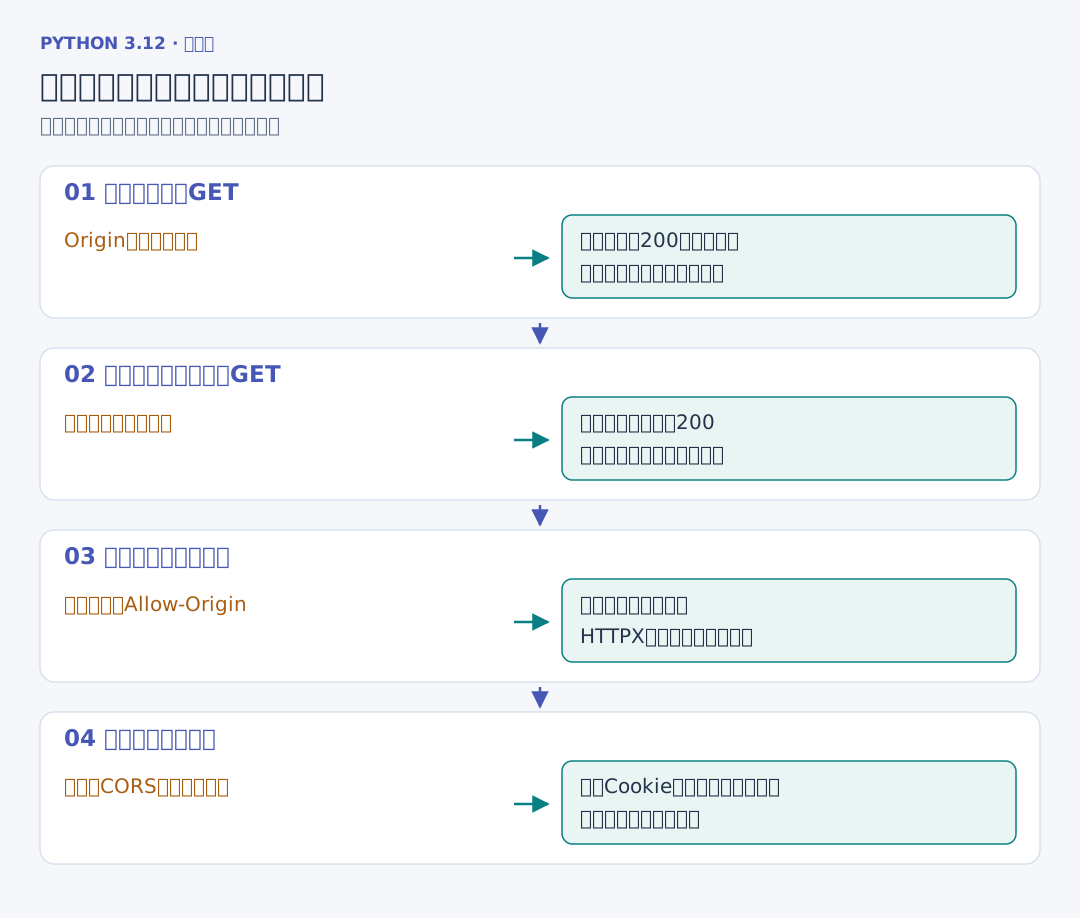
最后一行是“其他来源 200 False”:HTTPX 看到服务器返回 200,但响应没有跨源许可。HTTPX 没有浏览器的页面同源限制;真正的浏览器会阻止该页面脚本取得这份响应。
因此普通跨源请求可能已经到达服务器,CORS 本身不能替代写入前的身份、令牌和记录权限检查。预检通过也只表示浏览器可以继续发这类请求,实际请求仍会走应用处理过程。
4. 用两个端口实际对照
# 终端一:从web_project启动,明确允许另一端口的前端。
uv run web-books serve --cors-origin http://127.0.0.1:8768
# 终端二:同样在web_project目录提供samples页面。
uv run python -m http.server 8768 --bind 127.0.0.1 --directory ../samples
先在书架登录,再打开 http://127.0.0.1:8768/cross_origin.html:
<!-- 项目文件:samples/cross_origin.html -->
<!-- 从另一端口读取API,浏览器实际检查CORS;凭据选项控制是否携带Cookie。 -->
<!doctype html><html lang="zh-CN"><meta charset="utf-8"><title>跨源读取练习</title>
<body><h1>跨源读取书籍</h1><button id="read">读取当前账号的记录</button><pre id="result">等待操作</pre>
<script>
const api = new URLSearchParams(location.search).get("api") || "http://127.0.0.1:8767";
document.querySelector("#read").addEventListener("click", async () => {
    try {
        const response = await fetch(api + "/api/books", {credentials: "include"});
        document.querySelector("#result").textContent = response.status + "\n" + JSON.stringify(await response.json(), null, 2);
    } catch (error) {
        document.querySelector("#result").textContent = "浏览器未交出响应:" + error.message;
    }
});
</script></body></html>
URLSearchParams 读取页面查询参数,供练习时选择 API 地址;credentials:"include" 请求浏览器在跨源读取中也携带符合 Cookie 规则的凭据。同源策略与 Cookie 的站点规则分别继续生效。
把页面提供端口改成 8769,而服务器仍只允许 8768,再点击读取,就能在页面和 Network 中观察被浏览器拦下的响应。这里两边协议和主机相同、端口不同,属于跨源但仍是同站的情况。fetch 的凭据选项