(十八)提交后跳转与一次性消息
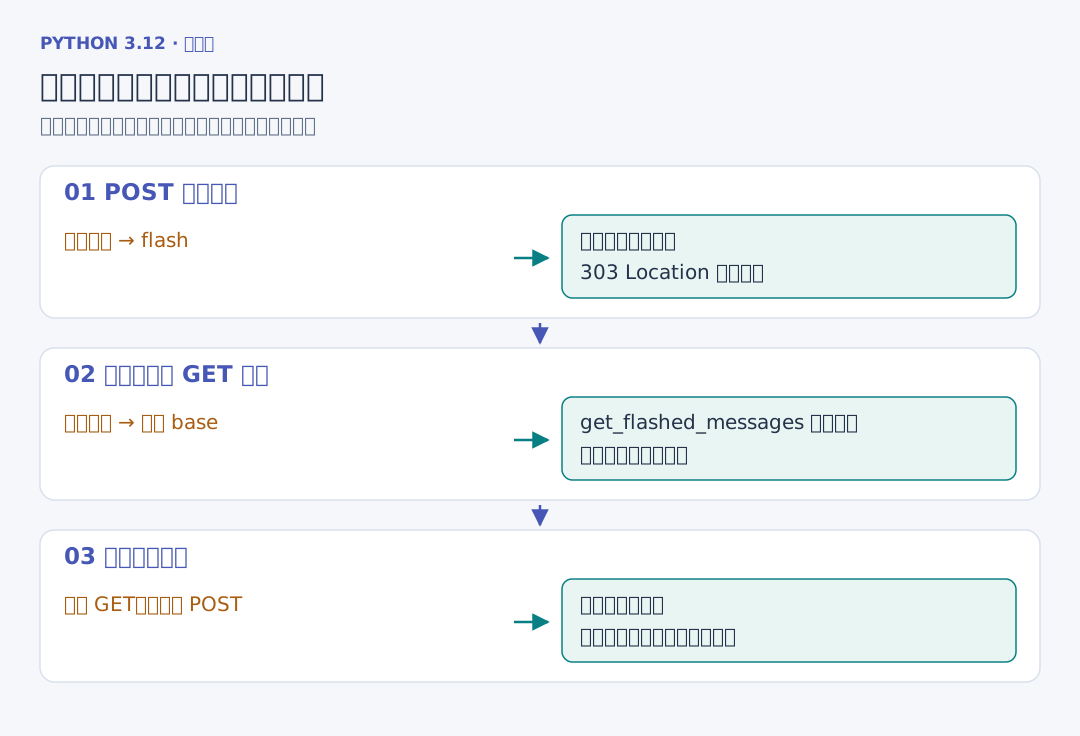
POST 成功之后直接返回页面,浏览器刷新时可能再次提交刚才的表单。本章成功后返回 303 Location,浏览器改为 GET 详情或列表;之后刷新重复的是读取动作。
flash("已保存书籍", "success") 把短消息暂存在会话中。下一页调用 get_flashed_messages(with_categories=true),取出类别和文本并显示;再刷新没有新的这条消息。模板中的 true 是 Jinja 布尔字面量。
共同布局在这里组合导航、消息和页面主体:
<!-- 项目文件:shelf_project/src/shelfweb/templates/base.html -->
<!doctype html>
<html lang="zh-CN">
<head>
  <meta charset="utf-8">
  <meta name="viewport" content="width=device-width, initial-scale=1">
  <title>{% block title %}个人书架{% endblock %} · Flask</title>
  <link rel="stylesheet" href="{{ url_for('static', filename='style.css') }}">
</head>
<body>
  {% from '_macros.html' import csrf_field %}
  <main>
    <header class="page-header">
      <div><p class="eyebrow">PYTHON 3.12 / FLASK</p><a class="brand" href="{{ url_for('shelf.index') }}">个人书架</a>
        <p class="muted">记录阅读进度,保存每次修改。</p></div>
      <nav aria-label="账号导航">
        {% if g.user %}
          <span>你好,{{ g.user.username }}</span>
          <a href="{{ url_for('shelf.index') }}">我的书架</a>
          <form method="post" action="{{ url_for('auth.logout') }}">
            {{ csrf_field() }}<button class="secondary" type="submit">退出登录</button>
          </form>
        {% else %}
          <a href="{{ url_for('auth.login') }}">登录</a><a href="{{ url_for('auth.register') }}">注册</a>
        {% endif %}
      </nav>
    </header>
    <!-- flash 消息在跳转后的页面读取并显示。 -->
    {% for category, message in get_flashed_messages(with_categories=true) %}
      <p class="notice {{ category }}" role="status">{{ message }}</p>
    {% endfor %}
    {% block content %}{% endblock %}
    <footer>Flask 页面 · Jinja 模板 · SQLite 持久化</footer>
  </main>
</body>
</html>
g.user 决定显示账号导航还是登录入口;退出按钮是带令牌的 POST 表单。url_for('static', ...) 生成 CSS 地址。category 来自服务端写入的消息类别,message 作为普通文本自动转义。
消息适合保存这类短提示。书籍列表继续从数据库查询,避免把整张书架塞进 Cookie。相关接口见 Flask 消息提示。