(十四)注册、登录与退出的完整状态变化
1. 每条请求先恢复当前用户
账号 Blueprint 统一在 /auth 下登记。先准备本次用户与受保护视图的装饰器:
# 项目文件:shelf_project/src/shelfweb/auth.py
import secrets
import sqlite3
import time
from functools import wraps

from flask import (
    Blueprint,
    abort,
    current_app,
    flash,
    g,
    redirect,
    render_template,
    request,
    session,
    url_for,
)
from werkzeug.security import check_password_hash, generate_password_hash

from .db import get_db
from .security import digest_token
from .validation import read_credentials

bp = Blueprint("auth", __name__, url_prefix="/auth")


@bp.before_app_request
def load_user():
    # 每次请求重新恢复身份,不沿用上一请求的 g.user。
    g.user = None
    raw = session.get("sid")
    if isinstance(raw, str):
        row = (
            get_db()
            .execute(
                "SELECT u.id,u.username FROM logins l JOIN users u ON u.id=l.user_id "
                "WHERE l.digest=? AND l.expires_at>?",
                (digest_token(raw), int(time.time())),
            )
            .fetchone()
        )
        if row is None:
            session.clear()
        else:
            g.user = dict(row)


def login_required(view):
    @wraps(view)
    def wrapped(*args, **kwargs):
        if g.user is None:
            if request.blueprint == "api":
                abort(401, description="请先登录")
            return redirect(url_for("auth.login"), code=303)
        return view(*args, **kwargs)

    return wrapped
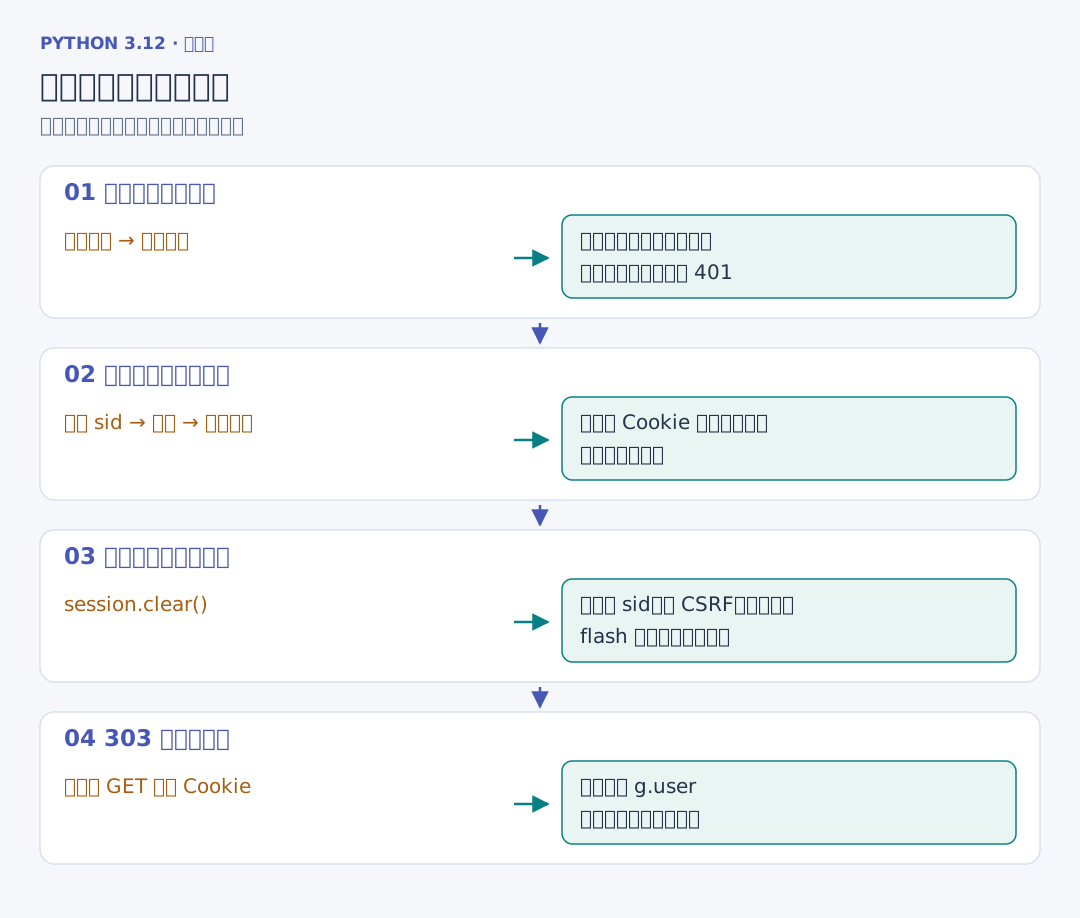
before_app_request 在应用处理每条请求之前运行,而不只对账号 Blueprint 生效。load_user 把公开的用户编号与用户名放进 g.user,后续页面和业务函数可以复用。Cookie 中有 sid,但数据库记录消失或到期时,清空会话并保持未登录状态。
login_required 沿用第三章的装饰器与 wraps,先判断用户,再调用原函数。页面跳转到登录页,JSON 入口则返回 401。request.blueprint 给出当前入口所属的功能组。路由装饰器放在最外层,登记的是已经包好身份检查的函数。
2. 注册先验证字段,再保存密码摘要
# 续写同一文件:shelf_project/src/shelfweb/validation.py
def read_credentials(form):
    username = form.get("username", "").strip()
    password = form.get("password", "")  # 密码中的空格参与核对。
    errors = {}
    if re.fullmatch(r"[a-zA-Z0-9_]{3,30}", username) is None:
        errors["username"] = "用户名使用 3 至 30 个字母、数字或下划线"
    if not 8 <= len(password) <= 128:
        errors["password"] = "密码请填写 8 至 128 个字符"
    if any(len(form.getlist(name)) != 1 for name in ["username", "password"]):
        errors["_form"] = "用户名和密码请各提交一次"
    if set(form) - {"username", "password", "csrf_token"}:
        errors["_form"] = "表单中有未识别的字段"
    return username, password, errors
用户名去掉两端空白,密码保留原有文本;长度和重复项逐项检查。页面出错后只保留用户名,密码框留空。
# 续写同一文件:shelf_project/src/shelfweb/auth.py
@bp.route("/register", methods=["GET", "POST"])
def register():
    # 用户名可回显,密码只用于本次校验与摘要计算。
    username, errors, status = "", {}, 200
    if request.method == "POST":
        username, password, errors = read_credentials(request.form)
        status = 422
        if not errors:
            connection = get_db()
            try:
                with connection:
                    connection.execute(
                        "INSERT INTO users(username,password_hash) VALUES (?,?)",
                        (username, generate_password_hash(password)),
                    )
            except sqlite3.IntegrityError as exc:
                if exc.sqlite_errorname != "SQLITE_CONSTRAINT_UNIQUE":
                    raise
                errors["username"], status = "这个用户名已经被使用", 409
            else:
                flash("注册成功,请登录", "success")
                return redirect(url_for("auth.login"), code=303)
    return render_template(
        "auth/form.html", action="register", username=username, errors=errors
    ), status
generate_password_hash 沿用前两章的密码摘要。成功插入并提交后,flash 暂存一条消息,接着 redirect(..., code=303) 让浏览器 GET 登录页;消息在下一次模板读取时显示。用户名重复则回到本次表单,状态为 409。
3. 登录同时改变服务器与浏览器状态
# 续写同一文件:shelf_project/src/shelfweb/auth.py
@bp.route("/login", methods=["GET", "POST"])
def login():
    username, errors, status = "", {}, 200
    if request.method == "POST":
        username, password, errors = read_credentials(request.form)
        status = 422
        if not errors:
            connection = get_db()
            user = connection.execute(
                "SELECT * FROM users WHERE username=?", (username,)
            ).fetchone()
            if user is None or not check_password_hash(user["password_hash"], password):
                errors["_form"], status = "用户名或密码不正确", 401
            else:
                raw = secrets.token_urlsafe(32)
                seconds = int(current_app.permanent_session_lifetime.total_seconds())
                with connection:
                    previous = session.get("sid")
                    if isinstance(previous, str):
                        connection.execute(
                            "DELETE FROM logins WHERE digest=?",
                            (digest_token(previous),),
                        )
                    connection.execute(
                        "INSERT INTO logins(digest,user_id,expires_at) VALUES (?,?,?)",
                        (digest_token(raw), user["id"], int(time.time()) + seconds),
                    )
                session.clear()  # 切换身份时同时替换表单令牌。
                session["sid"] = raw
                session["csrf_token"] = secrets.token_urlsafe(32)
                session.permanent = True
                flash("登录成功", "success")
                return redirect(url_for("shelf.index"), code=303)
    return render_template(
        "auth/form.html", action="login", username=username, errors=errors
    ), status
用户名和密码正确之后,先在事务中撤销当前旧登录、保存新摘要与到期时间。事务成功,再清空旧 Cookie 会话,写入新的随机 sid、新的 CSRF 令牌和永久会话标记,最后跳转书架。下一次请求才能通过新凭据恢复 g.user。
current_app.permanent_session_lifetime 从配置得到一个 timedelta,.total_seconds() 取得秒数,数据库用当前时间加这段长度保存到期时间。错误密码返回登录页和 401,页面没有把密码填回 HTML。
4. 退出撤销当前登录
# 续写同一文件:shelf_project/src/shelfweb/auth.py
@bp.post("/logout")
@login_required
def logout():
    # 先撤销服务器记录,再清空浏览器会话,使旧 Cookie 副本也失效。
    connection = get_db()
    with connection:
        connection.execute(
            "DELETE FROM logins WHERE digest=?", (digest_token(session["sid"]),)
        )
    session.clear()
    flash("已退出登录", "success")
    return redirect(url_for("auth.login"), code=303)
退出是 POST,也先检查表单令牌。删除当前摘要后,清空本次会话,再把退出消息留给登录页。它只撤销当前这份登录记录,同一账号在另一客户端建立的独立记录仍然存在。
注册与登录共用下面的页面。set 定义模板局部名称,~ 在这里拼接 auth. 与动作名,生成 url_for 所需的端点。autocomplete 告诉浏览器这是用户名、已有密码还是新密码。
<!-- 项目文件:shelf_project/src/shelfweb/templates/auth/form.html -->
{% extends 'base.html' %}
{% from '_macros.html' import csrf_field, field_error %}
{% set heading = '注册账号' if action == 'register' else '登录书架' %}
{% block title %}{{ heading }}{% endblock %}
{% block content %}
<section class="panel auth-panel">
  <p class="eyebrow">{{ '创建自己的书架' if action == 'register' else '继续你的阅读记录' }}</p>
  <h1>{{ heading }}</h1>
  <p class="muted">登录后可以添加、修改和删除自己的书籍。</p>
  <form method="post" action="{{ url_for('auth.' ~ action) }}">
    {{ csrf_field() }}{{ field_error(errors, '_form') }}
    <label for="username">用户名</label>
    <input id="username" name="username" value="{{ username }}" required minlength="3" maxlength="30" autocomplete="username">
    {{ field_error(errors, 'username') }}
    <label for="password">密码</label>
    <!-- 出错后只保留用户名,密码输入框保持空白。 -->
    <input id="password" name="password" type="password" required minlength="8" maxlength="128"
           autocomplete="{{ 'new-password' if action == 'register' else 'current-password' }}">
    {{ field_error(errors, 'password') }}
    <button type="submit">{{ '注册' if action == 'register' else '登录' }}</button>
  </form>
  <p class="muted">{{ '已有账号?可以直接登录。' if action == 'register' else '还没有账号?可以先注册。' }}</p>
</section>
{% endblock %}