(九)参数化与错误结果的检查
1. 同一个函数接收多组数据
统计函数放在业务包里,测试通过导入调用它:
# 项目文件:quality_project/src/readingapp/stats.py
# 统计不依赖文件或数据库,可以直接用小数据核对。
from collections.abc import Iterable, Sequence


def count_met(minutes: Iterable[int], goal: int) -> int:
    return sum(value >= goal for value in minutes)


def average_minutes(minutes: Sequence[int]) -> float:
    if not minutes:
        raise ValueError("记录为空")
    return sum(minutes) / len(minutes)
Iterable[int] 表示可以逐项取得整数;计数只遍历一遍。Sequence[int] 还提供长度和按位置访问,平均数用到 len。这两个类型来自 collections.abc,沿用第三章的迭代与类型注解。
# 项目文件:quality_project/tests/unit/test_stats.py
# 每一行生成一次独立调用,ids 让失败报告直接指出是哪组数据。
import pytest

from readingapp.stats import average_minutes, count_met


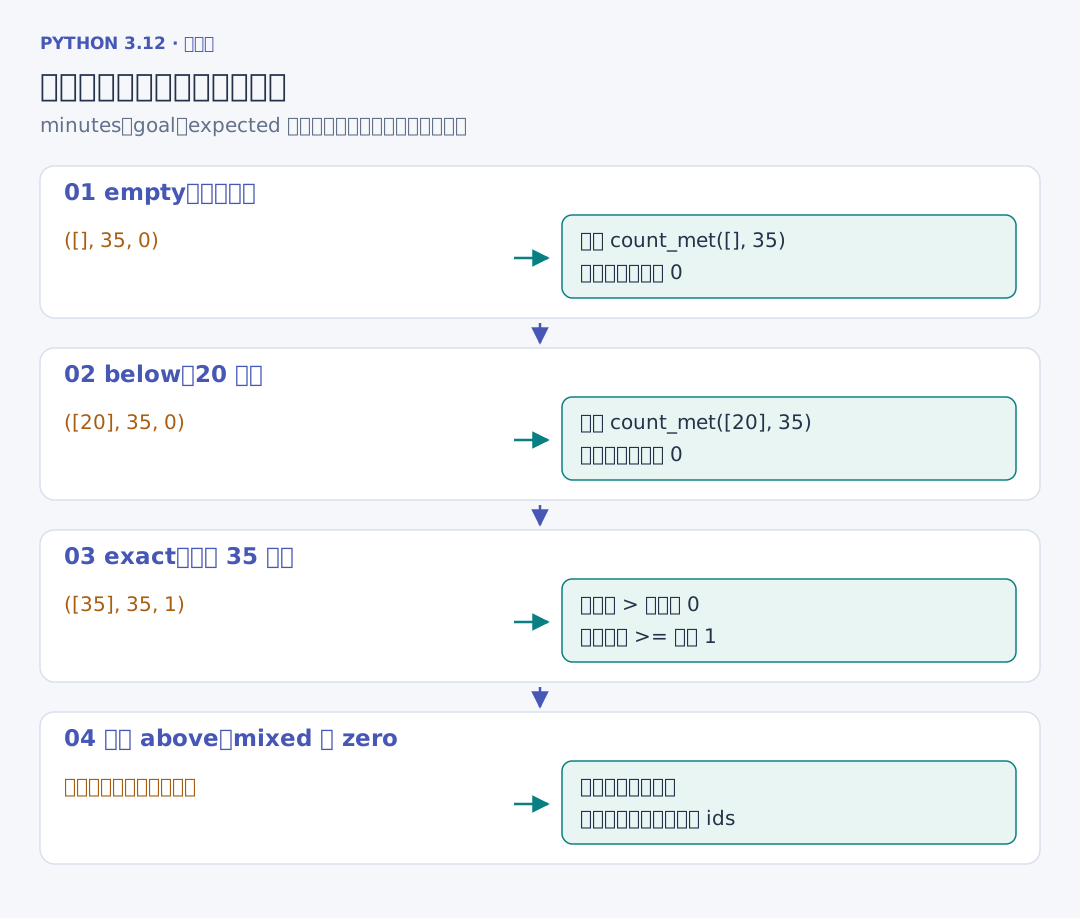
@pytest.mark.parametrize(
    "minutes, goal, expected",
    [([], 35, 0), ([20], 35, 0), ([35], 35, 1), ([45], 35, 1), ([20, 35, 45], 35, 2), ([0], 0, 1)],
    ids=["empty", "below", "exact", "above", "mixed", "zero"],
)
def test_count_met(minutes, goal, expected):
    assert count_met(minutes, goal) == expected


def test_average():
    assert average_minutes([20, 35]) == pytest.approx(27.5)


def test_empty_average():
    with pytest.raises(ValueError, match="记录为空"):
        average_minutes([])
装饰器中的名称对应函数参数,每个三元组依次提供列表、目标与期望值。pytest 一共收集八次测试调用,test_count_met[exact] 就是留下的 [35] 失败记录。参数化测试
pytest.approx 比较浮点数的近似结果;精确的整数计数仍用 ==。pytest.raises 是一个上下文管理器:主体抛出匹配的异常才通过,没有异常或出现另一类异常都会失败。match 用正则表达式检查错误说明;取得 as error 后,可以读取 error.value 查看实际异常对象。它与第五章的 with 使用相同的进入、主体、退出过程。断言与异常检查
2. 选择与重跑需要检查的测试
# 在 quality_project 根目录运行;所有命令使用同一个项目环境。
uv run python -m pytest tests/unit/test_stats.py -q
# :: 后面选择函数,方括号选择参数化生成的一次调用。
uv run python -m pytest "tests/unit/test_stats.py::test_count_met[exact]" -q
# -k 按名称筛选,-x 在第一次失败后停止,--lf 优先只重跑上次失败项。
uv run python -m pytest -k average -x
uv run python -m pytest --lf
--collect-only -q 只列出收集结果;-v 显示各次调用名;-s 让普通输出直接显示。--lf 在没有失败记录时会运行全部测试。完整检查仍需要运行不带筛选条件的 python -m pytest,单个用例通过后继续检查其他行为。运行与筛选