(四)把 HTML 文本解析成文档树
1. 标签、属性和文字节点
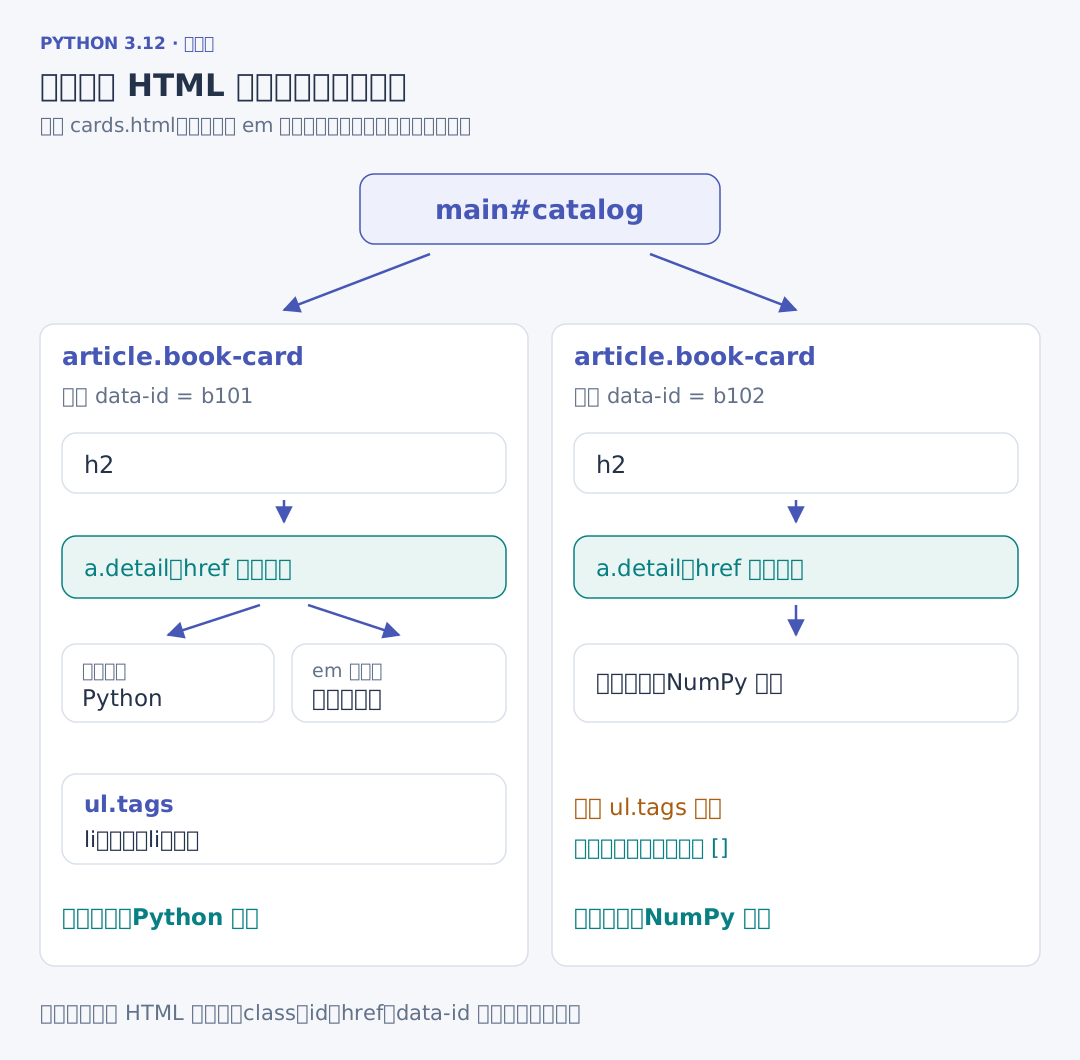
先只处理两张卡片。将下面的内容放在配套的 samples/cards.html,第二张卡片没有标签列表:
<!-- 项目文件:samples/cards.html -->
<!-- 两张卡片的标签数量不同,字段应当在各自的 article 内提取。 -->
<main id="catalog">
  <article class="book-card" data-id="b101" data-finished="false">
    <h2><a class="detail" href="../books/b101">Python <em>入门</em></a></h2>
    <ul class="tags"><li>基础</li><li>语法</li></ul>
  </article>
  <article class="book-card" data-id="b102" data-finished="true">
    <h2><a class="detail" href="../books/b102">NumPy 实践</a></h2>
  </article>
</main>
<h2>...</h2> 由开始标签、内部内容与结束标签组成,class="book-card" 是写在开始标签上的属性。id 标识具体节点,class 可以给多张卡片标出共同类别。这里的 main 包含两个 article;每个 article 包含自己的书名。第一本的 a 中又包含普通文字 Python 和 em 标签中的 入门。这种包含关系称为文档树,Beautiful Soup 把它组织成可以查找和遍历的 Python 对象。
# 项目文件:demos/dom_walk.py
# a 下面既有文字又有 em,get_text 合并各段文字;string 不是任意节点的全文。
from pathlib import Path

from bs4 import BeautifulSoup

path = Path(__file__).resolve().parents[1] / "samples/cards.html"
soup = BeautifulSoup(path.read_text(encoding="utf-8"), "html.parser")
anchor = soup.select_one("a.detail")
print(anchor.name, anchor.parent.name)
print(anchor["href"], anchor.get("title", "无说明"))
print(anchor.string)
print(anchor.get_text(" ", strip=True))
print(type(anchor.em.string).__name__)
依次得到 a h2、链接与 无说明、None、Python 入门、NavigableString。anchor.name 是标签名,.parent 找到父标签;anchor["href"] 读取已有属性,.get 可以在属性没有提供时返回指定值。
anchor.string 没有在这里交回全文,因为 a 同时包含文字和子标签。get_text(" ", strip=True) 收集其中的各段文字、去掉每段首尾空白,再用空格连接。anchor.em 找到内部第一个 em 标签;其中的那段文字是 NavigableString,可以按字符串继续处理。
BeautifulSoup(html, "html.parser") 明确选择 Python 自带的 HTML 解析器。HTML 会被解析成树,标签也可能因文档缺失而被整理;观察提取结果时,继续查看解析得到的具体节点。Beautiful Soup 文档