(二)让路径对应到 Python 函数
1. 第一次 JSON 响应
先看 first_routes.py。它把一条书籍留在内存中,让我们专注于请求进入函数的过程。
# 项目文件:demos/first_routes.py
from typing import Annotated

from fastapi import FastAPI, Path, Query

app = FastAPI(title="第一份书籍接口")
books = {1: {"id": 1, "title": "Python 入门", "finished": False}}


@app.get("/hello")
def hello():
    # 返回字典,FastAPI 将它转换为 JSON 响应。
    return {"message": "书籍服务已启动"}


@app.get("/books/search")
def search(q: Annotated[str, Query(min_length=1)]):
    # 静态路径先注册,避免 search 先被当成 book_id。
    return [book for book in books.values() if q in book["title"]]


@app.get("/books/{book_id}")
def read_book(book_id: Annotated[int, Path(ge=1)]):
    # 此处先观察路径转换;找不到记录交回空值,后面再明确 404。
    return books.get(book_id)


@app.get("/books")
def list_books(
    finished: bool | None = None, limit: Annotated[int, Query(ge=1, le=100)] = 20
):
    selected = list(books.values())
    if finished is not None:
        selected = [book for book in selected if book["finished"] == finished]
    return selected[:limit]
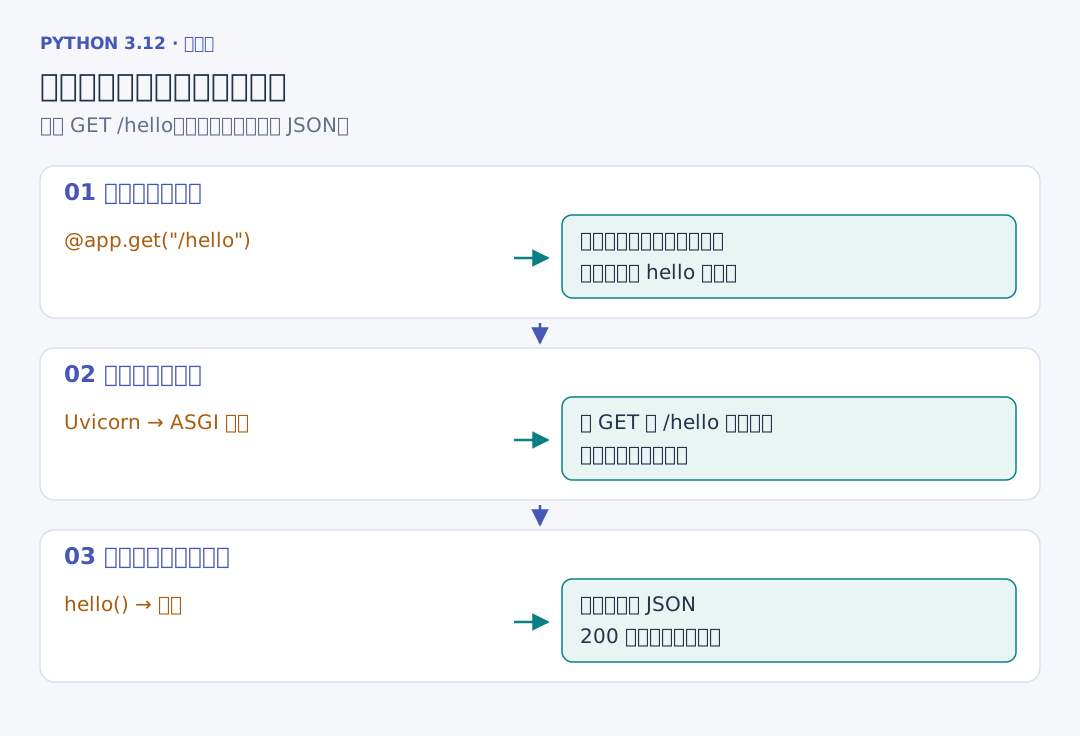
app = FastAPI() 创建 ASGI 应用。@app.get("/hello") 在导入模块时登记一条规则:收到 GET /hello 时调用紧接着的 hello 函数。访问之前并没有提前执行函数体。返回的字典会成为 JSON 正文,默认成功状态为 200。
在 api_project 中运行:
# --app-dir 指出演示文件所在目录;first_routes:app 表示模块中的 app 对象。
uv run python -m uvicorn first_routes:app --app-dir ../demos --port 8769
浏览器打开 hello 接口,可以看到 {"message":"书籍服务已启动"}。终端按 Ctrl+C 结束。Uvicorn 负责网络通信,函数只处理已经到达应用的请求。
2. 静态路径与动态路径
/books/{book_id} 中的大括号捕获这一段路径。请求 /books/1 时,把文本 "1" 转成整数 1,传给 book_id。/books/search 表示固定动作,因此先于动态路径登记。否则 search 会先落进 book_id,随后在整数校验处得到 422。
路由还包括请求方法。GET /books 用来读取,POST /books 用来新增,路径相同也可以对应不同函数。完整项目中,存在路径却使用不支持的方法得到 405,没有登记的路径得到 404。