(十三) 常用标准流与输出格式
会读取整数与整行文本后,再核对题目要求怎样输出:多少位小数、是否需要补齐宽度、哪些内容属于答案。
1. 标准输入输出流
#include <iostream>
using namespace std; // 使用标准命名空间

int main() {
    cout << "Hello, World!" << endl; // 输出并换行
    int x;
    cin >> x; // 输入
    cout << "x = " << x << endl;
}
也可以显式使用命名空间前缀:
// std:: 前缀明确命名空间;endl 同时换行并刷新输出流。
#include <iostream>
int main() {
    std::cout << "Hello, World!" << std::endl;
}
说明:
cin 是标准输入流,通常使用 >> 按类型读取;scanf 按格式字符串读取,它们的用法和缓冲机制不同。
cout 是标准输出流,通常使用 << 写出;printf 使用格式字符串,不能把两者的占位符规则混用。
endl:换行并刷新缓冲区。
2. iomanip 格式化输出
需要头文件:
// 输出精度、宽度和填充等格式控制需要此头文件。
#include <iomanip>
2.1 保留小数位数(fixed + setprecision)
#include <iostream>
#include <iomanip>
using namespace std;

int main() {
    double pi = 3.1415926535;

    cout << fixed << setprecision(2) << pi << endl; // 3.14
    cout << fixed << setprecision(4) << pi << endl; // 3.1416
}
说明:
fixed << setprecision(n):按定点格式显示小数点后 n 位。
默认浮点格式下,setprecision(n) 控制有效数字;scientific 格式下也控制小数点后的位数。
2.2 设置宽度(setw)
#include <iostream>
#include <iomanip>
using namespace std;

int main() {
    int a = 42, b = 1234;
    cout << setw(6) << a << endl; // 宽度为6,右对齐
    cout << setw(6) << b << endl; // 字段宽度不足时自动扩展,不截断数据
}
2.3 设置填充字符(setfill)
#include <iostream>
#include <iomanip>
using namespace std;

int main() {
    int x = 7;
    cout << setw(5) << setfill('0') << x << endl; // 00007
}
2.4 综合示例
// fixed 后 setprecision 表示小数位数;setw 只作用于下一次格式化插入。
#include <iostream>
#include <iomanip>
using namespace std;

int main() {
    double score = 95.6789;

    cout << "默认输出: " << score << endl;
    cout << "保留两位小数: " << fixed << setprecision(2) << score << endl;

    cout << "宽度8,空格补齐: [" << setw(8) << 123 << "]" << endl;
    cout << "宽度8,0补齐:    [" << setw(8) << setfill('0') << 123 << "]" << endl;
}
输出:
默认输出: 95.6789
保留两位小数: 95.68
宽度8,空格补齐: [     123]
宽度8,0补齐:    [00000123]
3. 输出格式状态的保留与重置
| 设置 | 影响 | 后续是否保留 |
|---|---|---|
| fixed、scientific、defaultfloat | 浮点显示形式 | 保留,直到换模式 |
| setprecision(k) | 精度;含义取决于显示模式 | 保留 |
| setfill(ch) | 字段不足时使用的填充字符 | 保留 |
| setw(k) | 下一次相关格式化输出的字段宽度 | 通常在该项输出后重置为 0 |
| boolalpha、noboolalpha | bool 输出文字或 0/1 | 保留 |
| hex、oct、dec | 整数输出进制 | 保留,直到换进制 |
题目原文(自拟演示): 程序无需输入。先输出 false、true 的文字,再恢复数字输出 true;最后把整数 7 用宽度 3 和字符 0 补齐,紧接着在另一对方括号内输出 8,不再设置宽度。
#include <iomanip>
#include <iostream>
using namespace std;

int main() {
    cout << boolalpha << false << ' ' << true << '\n';  // 输出 false true。
    cout << noboolalpha << true << '\n';                // 显式恢复,输出 1。
    cout << '[' << setfill('0') << setw(3) << 7 << ']'; // 本次整数按宽度补成 007。
    cout << '[' << 8 << "]\n";                          // setw 已重置,8 不会自动变成 008。
    cout << setfill(' ');                               // 填充字符会保留,需要时主动恢复为空格。
}
输出:
false true
1
[007][8]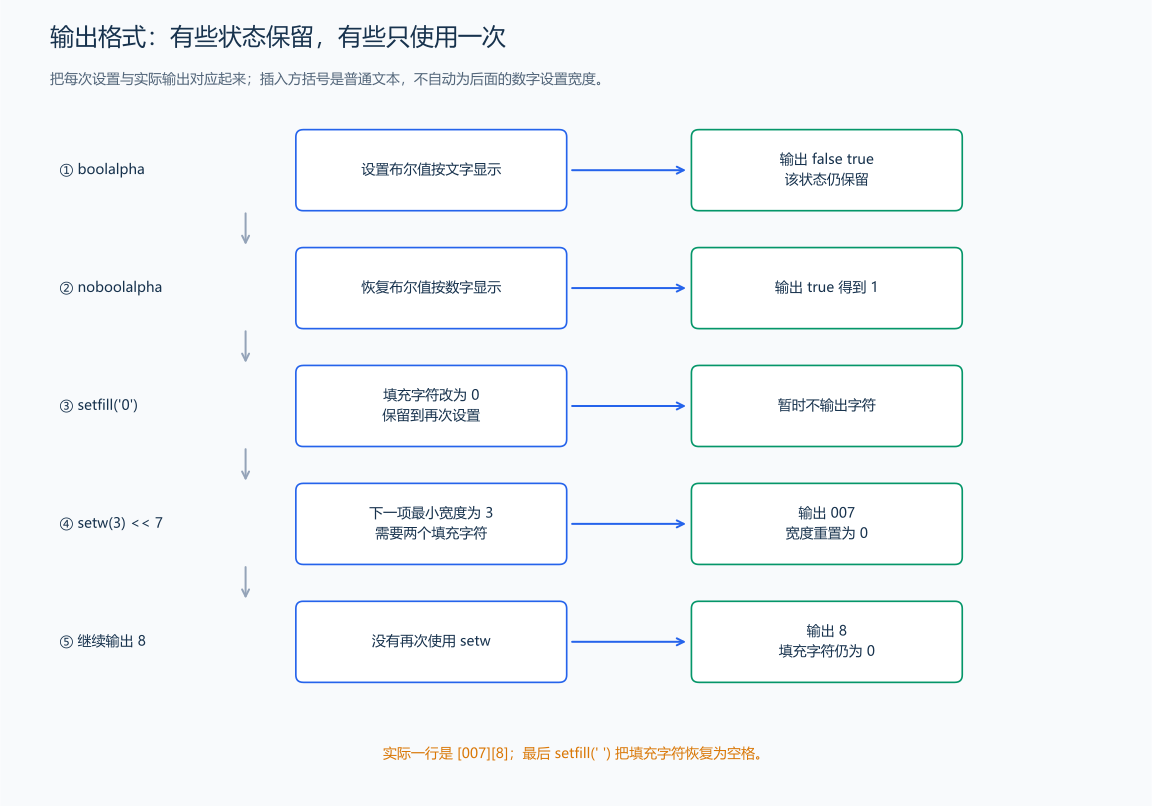
setw 是最小字段宽度,不会把较长结果截短。fixed 与 setprecision 只改变显示,不把变量的内部值改成四舍五入后的数;需要改变数值时,应明确执行相应计算。用 defaultfloat << setprecision(6) 可以恢复常见的默认浮点显示设置。
4. 输出格式的逐字符核对
答案要求一行两个数,就检查数之间是否只有规定的空格、末尾是否换行;输出表格时再分别核对宽度和对齐。先对照样例的结构,不把调试提示一起交给评测。大量普通批量输出用 '\n',交互询问按协议主动刷新;设置显示精度与刷新是不同操作。